Checking Wage Compliance
On public work, a labor classification that pays below the required minimum is a problem you want to find before you submit, not after. The Wages & Compliance panel on the Analyze tab checks each of your labor rates against its federal prevailing-wage minimum, where one exists, and flags anything below the floor.
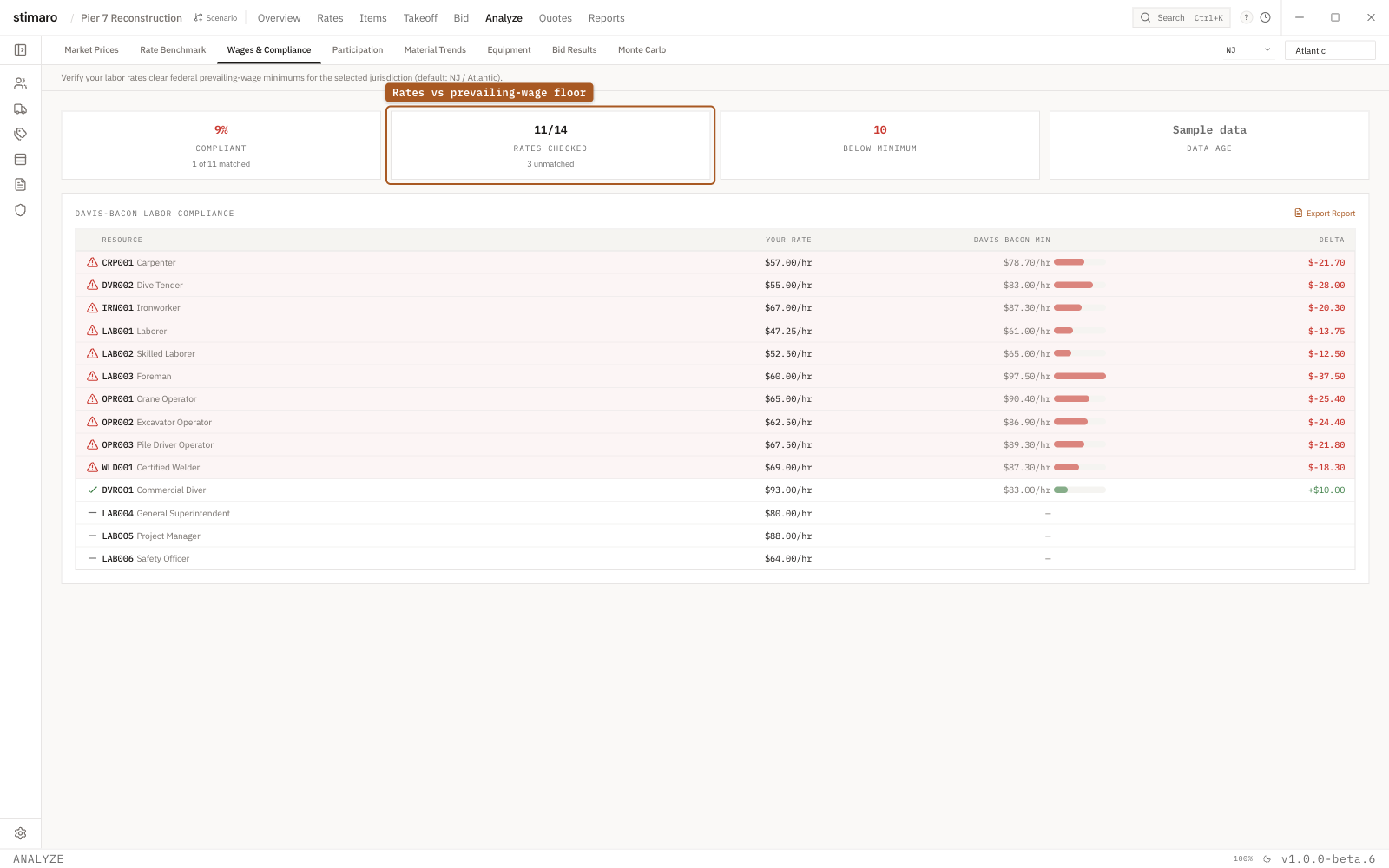
Wages & Compliance panel. Each labor rate is checked against its Davis-Bacon minimum, with anything below the floor flagged and sorted to the top.What the panel checks
Open it with Analyze → Wages & Compliance. Its subtitle states the purpose: "Verify your labor rates clear federal prevailing-wage minimums for the selected jurisdiction (default: NJ / Atlantic)."
The panel takes each labor rate in your project and compares it to its Davis-Bacon minimum for the selected jurisdiction. Each rate ends up in one of three states:
- Compliant — your rate is at or above the Davis-Bacon minimum.
- Below minimum — your rate falls under the minimum for that classification.
- No match — no Davis-Bacon minimum was found to check the rate against.
The summary cards
Four cards summarize the compliance check:
| Card | What it shows |
|---|---|
Compliant | The share of checked rates that clear their minimum, as a percentage. When no rates matched, it reads Unverified instead of a number. |
Rates Checked | How many rates were matched, of the total in your project. |
Below Minimum | How many rates fall under their minimum. Turns red when this is above zero. |
Data Age | How current the reference wage data is. |
The compliance table
The Davis-Bacon Labor Compliance table lists each checked rate. Below-minimum rows are highlighted and sorted to the top, so the rates that need attention are the first thing you see. The columns are:
| Column | What it shows |
|---|---|
| Status icon | A quick marker of whether the rate is compliant or below minimum. |
Resource | The code and description for the labor classification. Clickable — it takes you through to the Rates view to fix the rate. |
Your Rate | The rate from your project. |
Davis-Bacon Min | The prevailing-wage minimum for that classification in the selected jurisdiction. |
Delta | The dollars you sit over or under the minimum. |
Exporting the report
The table header has an Export Report button. Use it to save the compliance check for the bid file — a record that you verified your classifications against the prevailing-wage floors before submitting.
Using it before public bids
Run this panel as a preliminary check before bidding public work. The Below Minimum count and the highlighted rows at the top of the table flag classifications that may fall short of the federal floor, and the Resource link takes you straight to the rate to raise it. Because the check compares against sample wage data, a count of zero is a good sign but not a final clearance — confirm your classifications against the project's official wage determination before you rely on the result. Then export the report so the check lives with the rest of the bid documentation.