Benchmarking Your Rates
A stale rate in your library quietly sets a bad number — and you find out after you've lost the job, not before. The Rate Benchmark panel on the Analyze tab checks your labor and equipment rates against public references so you can catch the ones that have drifted while there's still time to fix them.
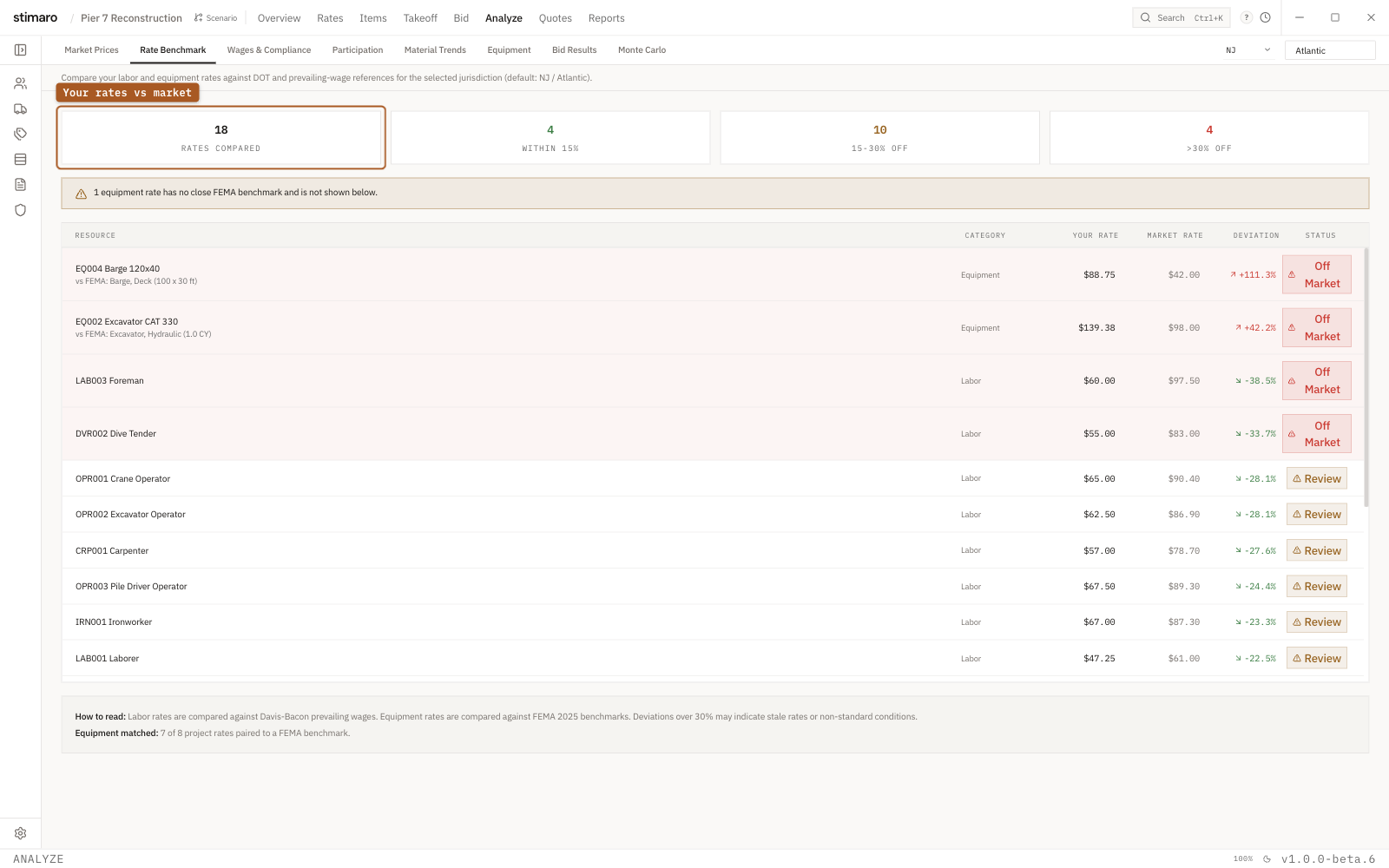
Rate Benchmark panel. Your labor rates are checked against Davis-Bacon prevailing wages and your equipment against FEMA rates, each line flagged OK, Review, or Off Market.What Rate Benchmark compares
Open the panel with Analyze → Rate Benchmark. Its subtitle states what it does: "Compare your labor and equipment rates against DOT and prevailing-wage references for the selected jurisdiction (default: NJ / Atlantic)."
The panel merges two separate comparisons into one table:
- Your labor rates against
Davis-Baconprevailing wages. These are shown only once you enter a county, because prevailing wages are county-specific. - Your equipment rates against
FEMA 2025benchmarks.
Setting the jurisdiction
A State selector and a County input sit at the top right, defaulting to NJ / Atlantic. Prevailing wages vary by jurisdiction, so set these to the letting's location before you read the labor comparison. Until you enter a county, the labor rows stay hidden and you'll see only the equipment comparison.
How deviation is measured
Every matched rate gets a deviation from its market reference:
Deviation = (your rate − market rate) / market rate
A positive deviation means your rate sits above the reference; a negative one means it sits below. Deviation is what the status badges and the summary cards are built on, so it's the number to watch as you scan the table.
The summary cards
Four cards across the top summarize the comparison:
| Card | What it counts |
|---|---|
Rates Compared | How many of your rates were matched to a reference and benchmarked. |
Within 15% | Rates whose deviation is within 15% of the reference. Shown in green. |
15-30% Off | Rates that deviate between 15% and 30%. |
>30% Off | Rates more than 30% off the reference — the ones most worth a second look. |
The comparison table
Each row is one of your rates beside its reference. The columns are:
| Column | What it shows |
|---|---|
Resource | The labor or equipment resource being benchmarked. |
Category | Whether the row is labor or equipment — which reference it was compared against. |
Your Rate | The rate from your project. |
Market Rate | The reference rate: Davis-Bacon prevailing wage for labor, FEMA 2025 for equipment. |
Deviation | How far your rate sits from the market rate, as a percentage. |
Status | A badge summarizing the deviation (see below). |
Reading the status badges
The Status badge turns the deviation into a verdict:
OK— the rate is within 15% of the reference.Review— the rate is within 30%. Worth a glance, but not necessarily wrong.Off Market— the rate is more than 30% off. These are the rows to check first.
A large deviation isn't automatically an error. As the panel's footer puts it: "Labor rates are compared against Davis-Bacon prevailing wages. Equipment rates are compared against FEMA 2025 benchmarks. Deviations over 30% may indicate stale rates or non-standard conditions." A rate can sit well off the benchmark for a legitimate reason — a specialized crew, an unusual delivery, a market the reference doesn't capture. The badge tells you where to look, not what the answer is.
The Equipment tab
A dedicated Equipment tab narrows the comparison to just your owned-equipment rates, benchmarked against FEMA hourly rates. Because your equipment is costed per day but FEMA publishes hourly rates, your daily rates are normalized to hourly on an 8-hour day so the two line up. The columns are:
| Column | What it shows |
|---|---|
Equipment | The owned-equipment resource being benchmarked. |
FEMA Match | The FEMA equipment type your rate was matched to. |
Project $/hr | Your daily rate normalized to an hourly figure on an 8-hour day. |
FEMA $/hr | The FEMA hourly benchmark rate. |
Delta | The gap between your hourly rate and the FEMA rate. |
Status | The same OK / Review / Off Market verdict, applied to this comparison. |
Using it before you bid
Rate Benchmark is a rate-hygiene check, not a pricing tool. Run it while your rates are still editable, treat the Off Market and >30% Off rows as a short list to verify, and either update the ones that have drifted or confirm the ones that are off for a real reason. Doing it here — before markup, before submission — keeps a stale library from quietly setting your number.