Setting Up Equipment Rates
This article explains how to set up equipment rates in Stimaro — how owned and rented equipment are handled separately, what goes into a daily equipment cost, and how the rate flows into your items.
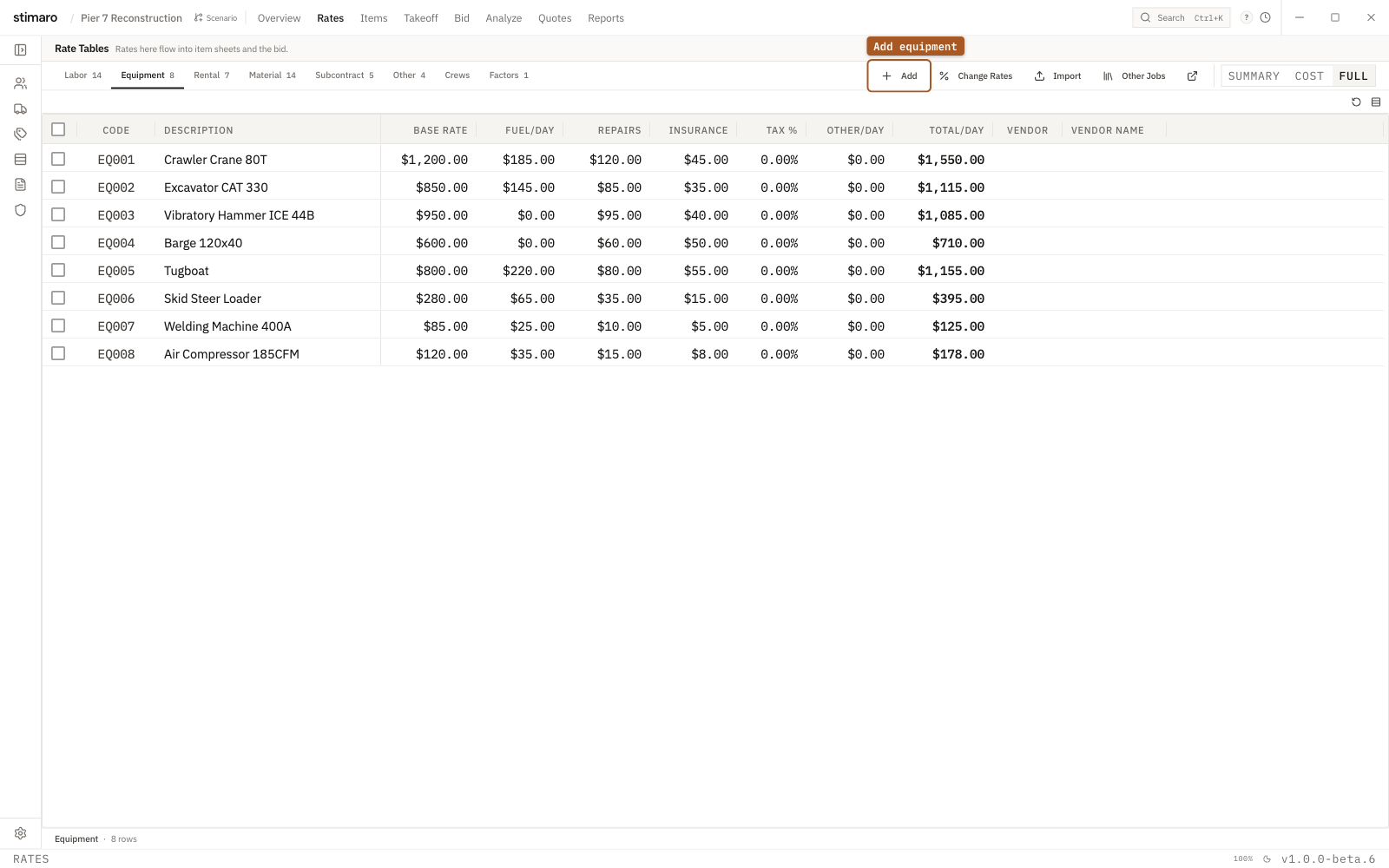
Equipment rate table. Enter the base rate plus fuel, repairs, and insurance per day; Stimaro totals the daily cost.Owned vs. rented: two sub-tabs
Stimaro keeps owned and rented equipment in separate places, because they're costed differently:
Equipmentsub-tab — for equipment you own, where the daily cost is built up from ownership components (the machine, fuel, repairs, insurance).Rentalsub-tab — for equipment you rent, where the cost is the vendor's rental rate plus any ancillary charges.
Both live on the Rates tab (Ctrl+2). Choose the sub-tab that matches how you're sourcing the equipment for the job.
Why owned and rented differ
When you own a machine, its true daily cost isn't a single number — it's the ownership cost plus what it burns through each day: fuel, maintenance, and insurance. When you rent, the rental company has already bundled most of that into their rate, so your cost is mostly just the rental rate itself (rentals typically include fuel, maintenance, and insurance in the price). Keeping them separate lets each be costed honestly.
Setting up owned equipment
On the Equipment sub-tab, each row builds up an owned machine's daily cost. The columns are:
Code— a short identifier (for example, EQ001).Description— the machine (for example, "Excavator — CAT 320").Entry Mode— how the rate is entered, such as Daily.Equip Rate— the base daily ownership cost of the machine.Fuel/Day— estimated daily fuel cost.Repairs/Day— a daily maintenance and repair reserve.Insurance/Day— daily insurance allocation.
Stimaro sums these into a Total Per Day — the all-in daily cost of running that machine.
To add one: on the Equipment sub-tab, click + Add, fill in the cells, and press Enter or click away. The Total Per Day calculates automatically.
Setting up rented equipment
On the Rental sub-tab, you record equipment you hire from a vendor. The columns are:
Code— a short identifier.Description— the equipment (for example, "40 ft Boom Lift").Base Rate— the vendor's daily rental rate.Fuel/Day,Repairs,Insurance— daily costs for fuel, maintenance, and insurance. Many rentals bundle these into the rate, in which case you leave them at zero; use them when your rental arrangement bills these separately.Tax %— sales tax on the rental, if it applies in your jurisdiction.Other/Day— any additional daily cost (a small supply or delivery cost, for example).VendorandVendor Name— the rental house this rate comes from.
Stimaro sums these into a Total/Day.
To add one: on the Rental sub-tab, click + Add, fill in the cells, and press Enter or click away. The Total/Day calculates automatically.
Editing an equipment rate
Equipment and rental rates edit inline. Click (or double-click) any cell, type the new value, and press Enter or click away. The Total Per Day recalculates immediately, and any item using the rate updates with it.
Tracking the vendor
You can record which vendor an equipment or rental rate comes from, which is useful when you maintain rates from several rental houses or want to keep your sourcing straight. Adding the vendor to your Vendors library first keeps the spelling consistent and connects to your vendor history. See Customers and Vendors libraries.
A note on hourly vs. daily
Equipment is costed per day by default. If a piece of equipment is billed hourly, set up a daily equivalent — for example, an hourly rate of $50 over an 8-hour day becomes a daily rate of $400 — so it lines up with how the rest of your equipment is priced.
How equipment rates connect to items
When you add an Equipment or Rental resource to an item (on the Items tab, using + Add Resource), you pick the rate by its code. Equipment cost is driven by time: you enter how many days the machine is needed and an optional factor (for overtime or extended-day use), and the daily rate multiplies through to the line total. Change the rate later, and every item using it recalculates automatically.