The Analyze Tab: Market Intelligence and Risk
This article explains the six panels on the Analyze tab — what each shows, how to use it, and which require an open project.
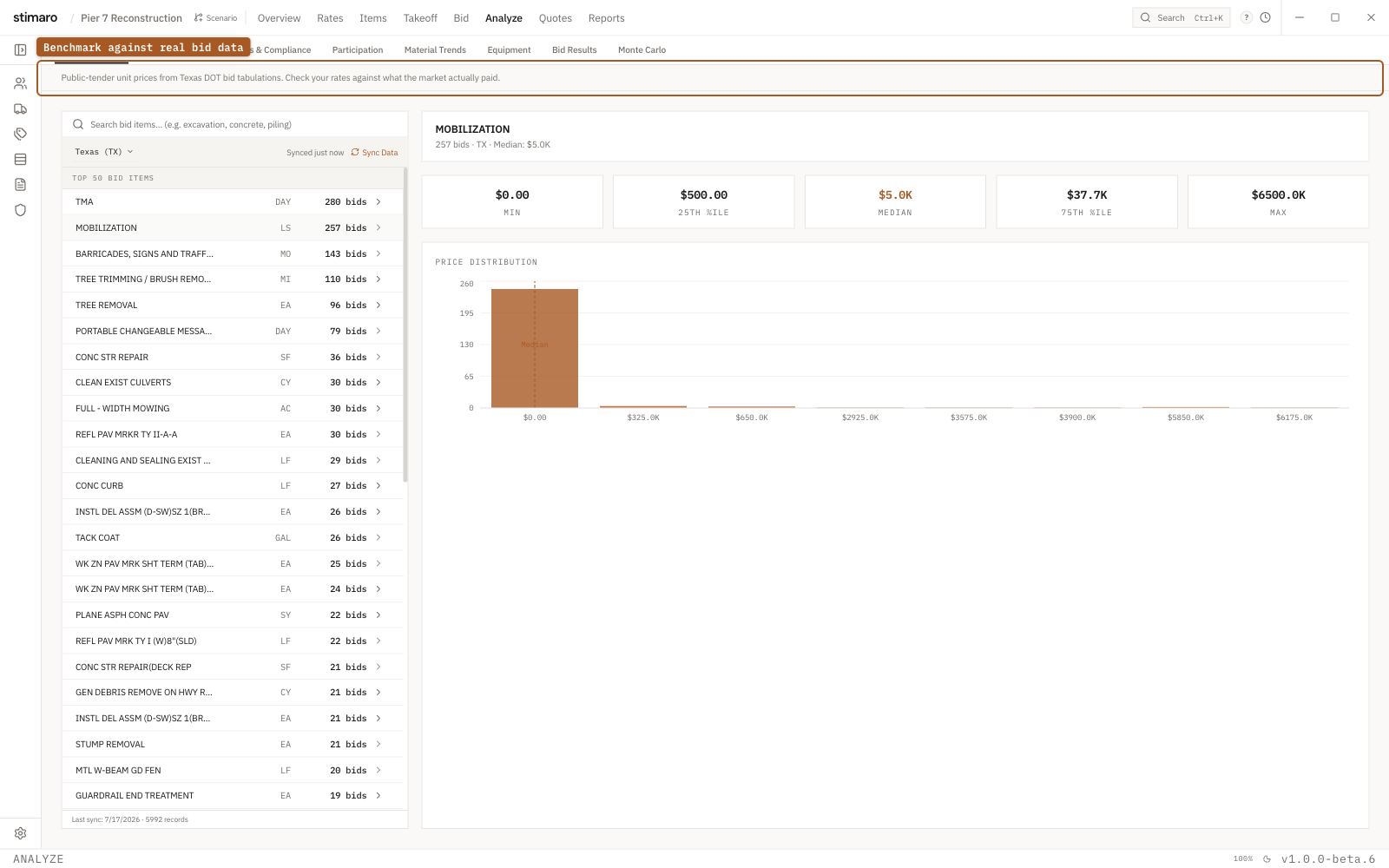
Analyze tab. Benchmark your rates against public bid tabulations — the min, median, and spread of what the market actually paid.Getting to Analyze
Click Analyze in the top bar (or press Ctrl+6). It opens to Market Prices by default. For the panels that use location data — Rate Benchmark and Wages & Compliance — set the jurisdiction with the State and County selectors in the header.
Market Prices
No project required.
Market Prices shows real unit prices from public-tender bid tabulations, so you can compare your rates against what the market actually paid. Search for an item (for example, "sheet pile") and select it to see its unit-price distribution — a histogram with P25, P50, and P75 markers — plus a yearly price trend and the individual bid data points behind it. Comparing the median (P50) market price against your own rate shows whether you're above, below, or in line with comparable bids.
Rate Benchmark
Requires an open project.
Rate Benchmark puts your project's labor and equipment rates beside public reference rates, so you can catch rates that are stale or out of range. It shows each matched rate with your rate, the reference rate, and the deviation, color-coded as within 15%, 15–30% off, or more than 30% off, with summary counts at the top. Labor is compared against Davis-Bacon prevailing-wage references for the selected state and county; equipment is compared against FEMA benchmark rates, with the matched FEMA type shown so you can check the pairing. Rates that can't be matched are flagged as unmatched.
Wages & Compliance
Requires an open project.
Wages & Compliance checks whether your labor rates meet federal Davis-Bacon prevailing-wage minimums for the selected state and county. It shows a compliance percentage, how many rates were checked, how many fall below minimum, and when the wage data was last updated, followed by a table sorted with below-minimum rates first. Each row shows your rate, the Davis-Bacon minimum, and how far above or below you sit. Click Export Report to save the comparison as a PDF.
Material Trends
No project required.
Material Trends tracks price movements for four common construction materials — steel, structural steel, concrete, and lumber — using Producer Price Index data from the U.S. Bureau of Labor Statistics. A chart shows 24 months of history, and trend chips show each material's 12-month change. The data reflects broad market indices, not your project's materials, so use it to understand market context — especially on longer-lead bids where today's quotes may not hold at project start.
Equipment
No project required.
The Equipment panel displays the FEMA Schedule of Equipment Rates as a reference table of equipment types and size classes with their benchmark hourly rate and effective year. FEMA publishes these for federal disaster-recovery reimbursement, but they're widely used as a baseline for owned-equipment cost recovery. To compare your own equipment rates against these benchmarks, use Rate Benchmark.
Monte Carlo
Requires an open project.
Monte Carlo runs thousands of cost scenarios across your estimate to show how confident you should be in your bid at a given markup, and which cost lines drive the most risk. It accounts for the uncertainty in each resource line based on how well-quoted it is — hard-quoted lines add little uncertainty, estimated lines add more.
Running a simulation. A control bar lets you choose the number of iterations (from a quick 1,000-scenario draft up to a 250,000-scenario exhaustive run), set or reroll the random seed, and optionally adjust the uncertainty bands for the run. The simulation runs automatically; click Re-simulate after changing inputs.
Reading the distribution. The central chart shows the probability distribution of simulated total costs — a green region where your bid covers cost, red where it doesn't. The large percentage is your profit probability (the share of scenarios where your bid beats cost), labeled Safe (≥80%), Risky (50–79%), or Unsafe (below 50%). Drag the vertical bid line to explore different markup levels and watch the probability update live. Percentile whiskers show the P10, P50, and P90 costs.
Top risks ranks the individual resource lines contributing the most cost uncertainty, so you can see exactly where your risk concentrates — usually the estimated, un-quoted lines.
Chase quotes shows which estimated lines are worth quoting out to tighten your risk, previewing how your P90 cost would improve if those lines were hard-quoted. A Create RFQ button sends the selected lines straight to the RFQ tab.
Markup curve plots profit probability across markup levels from 0% to 50%, shaded safe / risky / unsafe, with a readout of the markup needed to hit 80% confidence — a clear view of the tradeoff between margin and win probability.