Report Types and When to Use Them
This article describes every built-in report template in Stimaro and when each one is most useful.
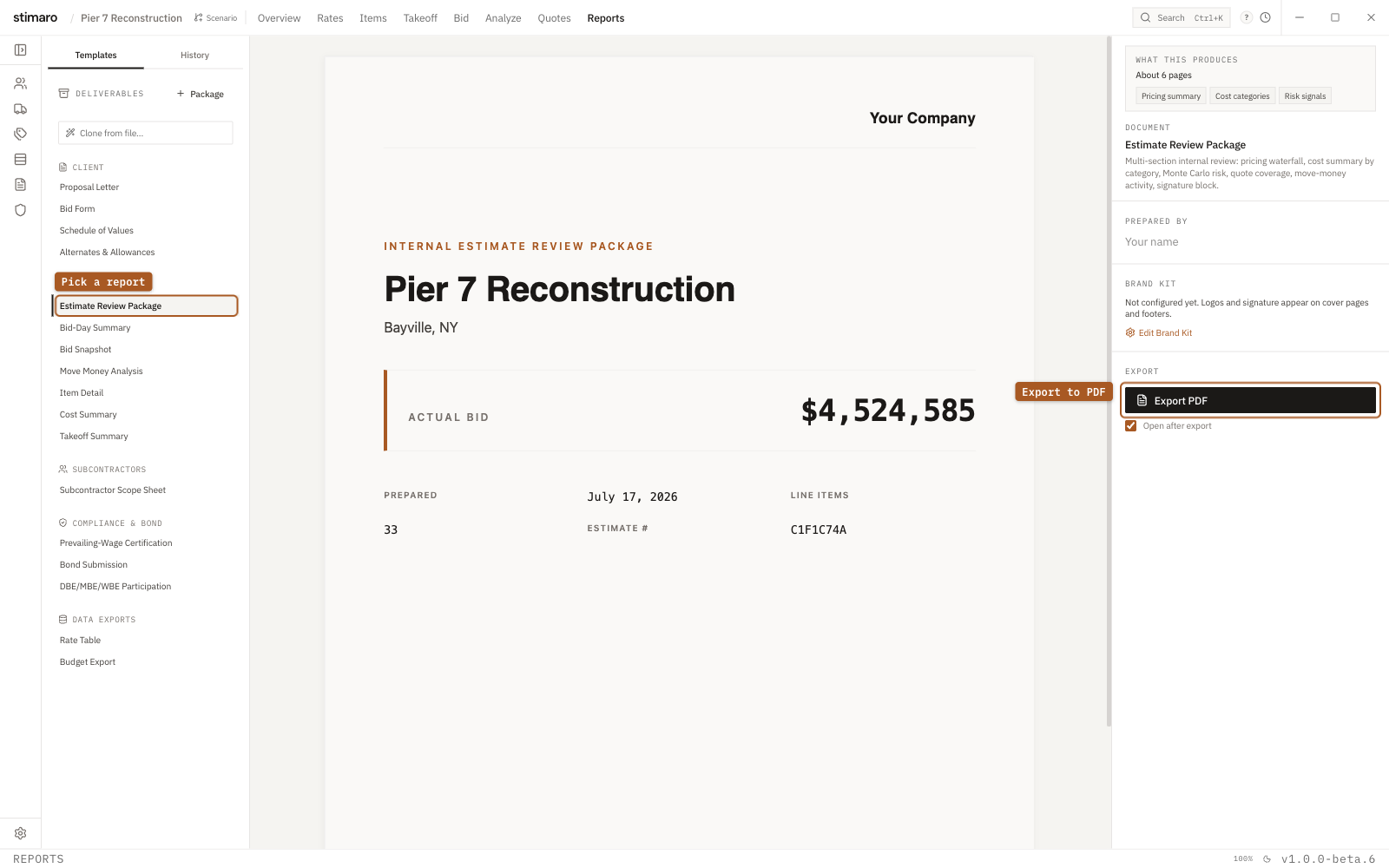
Accessing reports
Click the Reports tab in the top bar. The left panel lists all templates — built-ins first, then any you've authored or cloned. Click a template to preview it in the center pane; the right panel lets you configure options, apply your Brand Kit, and export. Reports can be exported individually or combined into a single paginated PDF using the Package Builder.
Client-facing reports
These go to an owner, GC, or client, and pull your Brand Kit (logo, company name, signature) automatically.
Proposal Letter — A one-page cover letter introducing your bid, with your letterhead, the client addressee, the total bid amount, and a signature block. Use it as the opening page of a submittal package or alongside a bid form.
Bid Form — A line-item bid form showing quantity, unit price, and extended total for every item, formatted for submission. It mirrors the structure of most owner-provided bid forms and includes a signature block. Use it when the owner requires a formal line-item price sheet.
Schedule of Values — An AIA G702-style schedule listing each item with its scheduled value, direct cost, overhead and profit, and retainage columns. Use it when a contract requires a Schedule of Values for progress billing.
Alternates & Allowances — A summary of your base bid alongside any alternate packages, with a total and active/inactive status for each. Use it when your bid includes additive or deductive alternates you need to present clearly.
Internal review reports
For your team — partners, leadership, internal cost review — not typically sent to a client.
Estimate Review Package — A multi-section internal document covering the full pricing waterfall, cost summary by category, Monte Carlo risk analysis, quote coverage, any move-money activity, and a signature block. This is the primary document to circulate internally before submitting. Use it for leadership sign-off or a bid-day review.
Bid Snapshot — A full landscape snapshot of the bid sheet — sequence, item number, description, quantity, unit, calculated bid unit, extended total, markup %, and each row's source and status. Use it for a point-in-time record or to archive the whole bid.
Move Money Analysis — A report of all active move-money transactions, showing the net shift per item and the category breakdown of each transfer. Use it after redistributing costs across bid items, to verify the transfers before submitting.
Item Detail — A full resource breakdown for a single item — the header followed by every resource row with quantity, factor, rate, and total, plus subtotals. Use it to review or document how one item was built up, or to share the detail behind a line with a partner or sub.
Cost Summary — A two-panel landscape summary: direct cost by category with each category's share, plus the full markup-layer waterfall from direct cost through overhead, profit, and bond to total bid. Use it for a quick cost-composition review or to explain your markup structure to a partner.
Subcontractor-facing reports
Subcontractor Scope Sheet — A scope letter for a subcontractor, listing the line items and resource detail within the subcontract scope with a blank price column for the sub to fill in. Use it to send a structured scope package when soliciting quotes, rather than forwarding your full bid.
Compliance reports
Bond Submission — A cover page for a surety, showing the bid amount, calculated bond premium, and your bond tier schedule. Use it as part of your bond application when a performance and payment bond is required.
Prevailing-Wage Certification — A certification that your labor classifications and rates meet federal prevailing-wage minimums, populated from your project's labor rates. Use it when a project is subject to Davis-Bacon or similar requirements and you need to certify compliance in writing.
Data export reports
These extract raw data for use in other systems and support PDF, CSV, or XLSX.
Rate Table — Exports any one of your rate tables (Labor, Equipment, Rental, Material, Subcontract, or Other) in landscape. Use it to share a rate table with a partner, attach it to an RFQ, or archive it at bid time.
Budget Export — An estimate-to-budget handoff for accounting, mapping direct costs to cost codes. Available as CSV or XLSX with a per-cost-code rollup and a per-item budget sheet. Use it to transfer your estimate into job cost accounting after award.
Authoring your own templates
Beyond the built-ins, you can create custom templates two ways: Duplicate an existing template and edit it in the Templates section of the left sidebar, or Clone from file by uploading a PDF, image, or DOCX of an existing report format and letting Stimaro generate a matching template (requires an active sign-in). Your templates appear in the same list as the built-ins and can be included in packages.